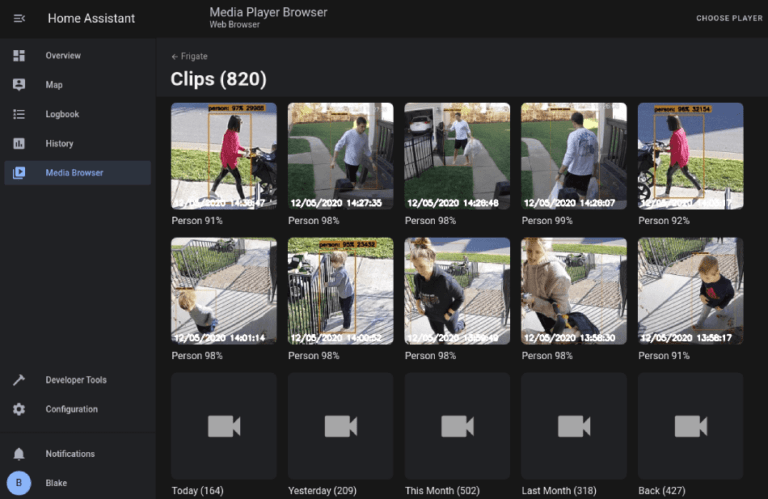

Using the Frigate integration in Home Assistant brings along all the information from Frigate into Home Assistant. Allowing you to build simple or complex automations for alerts and smart devices.
alias: "[TELEGRAM] Frigate person detected driveway"
description: Send a photo to telegram group when a person is detected via frigate.
triggers:
- topic: frigate_mint/events
variables:
after_zones: "{{ trigger.payload_json['after']['current_zones'] }}"
trigger: mqtt
conditions:
- condition: state
entity_id: input_boolean.telegram_person_send
state: "on"
- condition: template
value_template: "{{trigger.payload_json[\"type\"] == \"new\" }}"
enabled: true
- condition: template
value_template: "{{trigger.payload_json[\"after\"][\"camera\"] == \"Driveway\" }}"
- condition: template
value_template: "{{trigger.payload_json[\"after\"][\"label\"] == \"person\" }}"
- condition: template
value_template: "{{trigger.payload_json[\"after\"][\"area\"]| int > 6000}}"
enabled: true
actions:
- data:
url: http://172.22.2.111:5005/api/Driveway/latest.jpg?h=500&quality=99&bbox=1
target:
- ****telegramIDtosendTo****
authentication: digest
parse_mode: html
enabled: true
action: telegram_bot.send_photo
- metadata: {}
data: {}
enabled: true
action: shell_command.driveway_snap
- data:
target:
- ****telegramIDtosendTo****
authentication: digest
parse_mode: html
file: /config/www/cloud_plate/triggered_snap.jpg
enabled: true
action: telegram_bot.send_photo
mode: single
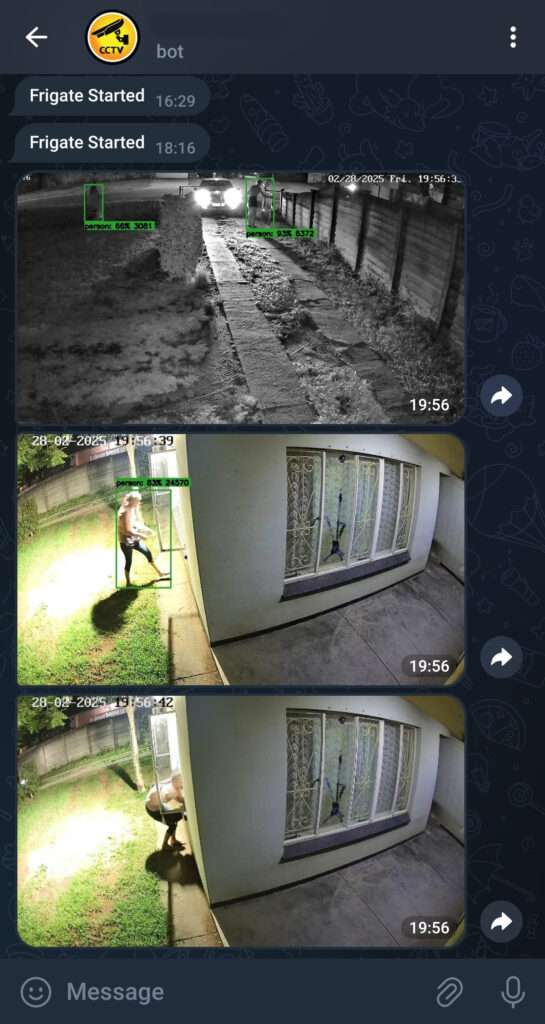
This is what a typical telegram message would look like.
A picture was sent as soon as the people crossed the gate zone.
Another picture was sent as soon as my wife entered the “Close to house” zone.
The final picture was sent when the Alarm got activated, because this time the critical zone was entered, which was leaning into the window. You don’t want people here when the Alarm is armed.
Beams would work in this situation YES. 1 single camera is covering 3 window zones.
You would need 3 beam sensors at a cost triple that of 1 camera.
The above Home Assistant automation will send me a Telegram snaphot of the latest frame of the driveway camera when ever a human is detected. Then based on the photo I can decide if it’s a friendly or an enemy.
Then HA will store a copy of the image to a folder.
I use this stored image on my HA dashboard so that every time a walk past my wall tablet I will be able to see who the last detected human was. Just in case maybe the cell network is down and Telegram not working.
Home Assistant has an integration called Alarmo. It works just like and alarm keypad panel.
alias: Alarm Triggered Open Keypad
description: ""
triggers:
- entity_id:
- alarm_control_panel.alarmo
to: pending
trigger: state
conditions: []
actions:
- data: {}
action: script.script_alarm_triggered_load_keypad
enabled: true
- if:
- condition: state
entity_id: binary_sensor.night
state: "on"
then:
- action: light.turn_on
metadata: {}
data: {}
target:
entity_id: light.mainbedroom_light
- delay:
hours: 0
minutes: 0
seconds: 3
milliseconds: 0
- action: light.turn_on
metadata: {}
data: {}
target:
entity_id: light.kitchen_light
- delay:
hours: 0
minutes: 0
seconds: 2
enabled: true
- action: light.turn_on
metadata: {}
data: {}
target:
entity_id:
- light.relay_1
enabled: true
mode: single
Above code will run whenever the Alarmo control panel has been set to Armed and the system was triggered by Human being to close to a predefined zone.
This automation will switch on lights in the house, with a short delay between lights. Making it look like a person is moving through the house switching lights in.
This alone usually makes wanabe criminals panic and run.